🎬 Are you a content creator looking to step up your video or photo game? Whether you’re shooting YouTube videos, live streams, or product photos, using a rental studio can be a game changer. But without the right know-how, even the best studio space can fall short of your expectations.
In this guide, we’ll dive deep into real-world tips from creators, shooting techniques, and insider advice tailored specifically for those filming in rental studios in the Osaka area. Get ready to transform your production quality! 💡
CONTENTS目次
- 🔍 Understanding the Challenges Creators Face
- 👤 Real Creator Experience: Why We Switched to a Rental Studio
- ✅ What Makes a Rental Studio Ideal for Filming?
- 📷 How to Maximize Your Filming Sessions
- 💡 Real-World Tips and Techniques
- 🌇 Example Scenes and Studio Settings
- 🎙️ Interview Setup
- 🛍️ Product Photography
- 👩🎤 YouTube Setup
- 🗣️ Creator Reviews & Testimonials
- ❓Frequently Asked Questions
- Q: Can I film with natural light only?
- Q: What’s the best lens for shooting in a small space?
- Q: Do studios provide equipment?
- Q: Is it suitable for live streaming?
- 📍 Featured Studio: Access & Info
- 📢 Ready to Book Your Next Session?
🔍 Understanding the Challenges Creators Face
Filming at home can lead to poor lighting, cluttered backgrounds, and noise interruptions. Many creators turn to rental studios for a more professional environment. However, without understanding how to fully utilize the space, even these studios can pose challenges like improper lighting setups or sound issues.
👤 Real Creator Experience: Why We Switched to a Rental Studio
As a small content team based in Osaka, we initially filmed all our content in a cramped apartment. The natural light was inconsistent, and the background was far from aesthetic. After moving to a rental photo studio near Nishi-Nakajima-Minamigata Station, the difference was night and day. With professional lighting, multiple backdrops, and quiet surroundings, our production quality improved significantly. 💪
✅ What Makes a Rental Studio Ideal for Filming?
Choosing a good studio isn’t just about location. Here’s what to look for:
- 🌞 Natural lighting (especially important for soft portraits and live sessions)
- 📸 White backdrop or white cyclorama wall (for clean and professional looks)
- 💡 Studio-grade lighting equipment
- 📶 High-speed Wi-Fi for live streaming
- 🎙️ Sound-dampened environment
- 🪟 Window setups for mood lighting and lifestyle shoots
📷 How to Maximize Your Filming Sessions
Here’s how to make the most of your studio time:
- ⏰ Plan your shoot in advance – script, props, and scene list
- 🔌 Test lighting before you start filming
- 🎥 Use prime lenses (like a 35mm or 50mm f/1.8) for portraits
- 🔈 Bring external microphones to improve audio quality
- 🛋️ Use the background paper options for variety
💡 Real-World Tips and Techniques
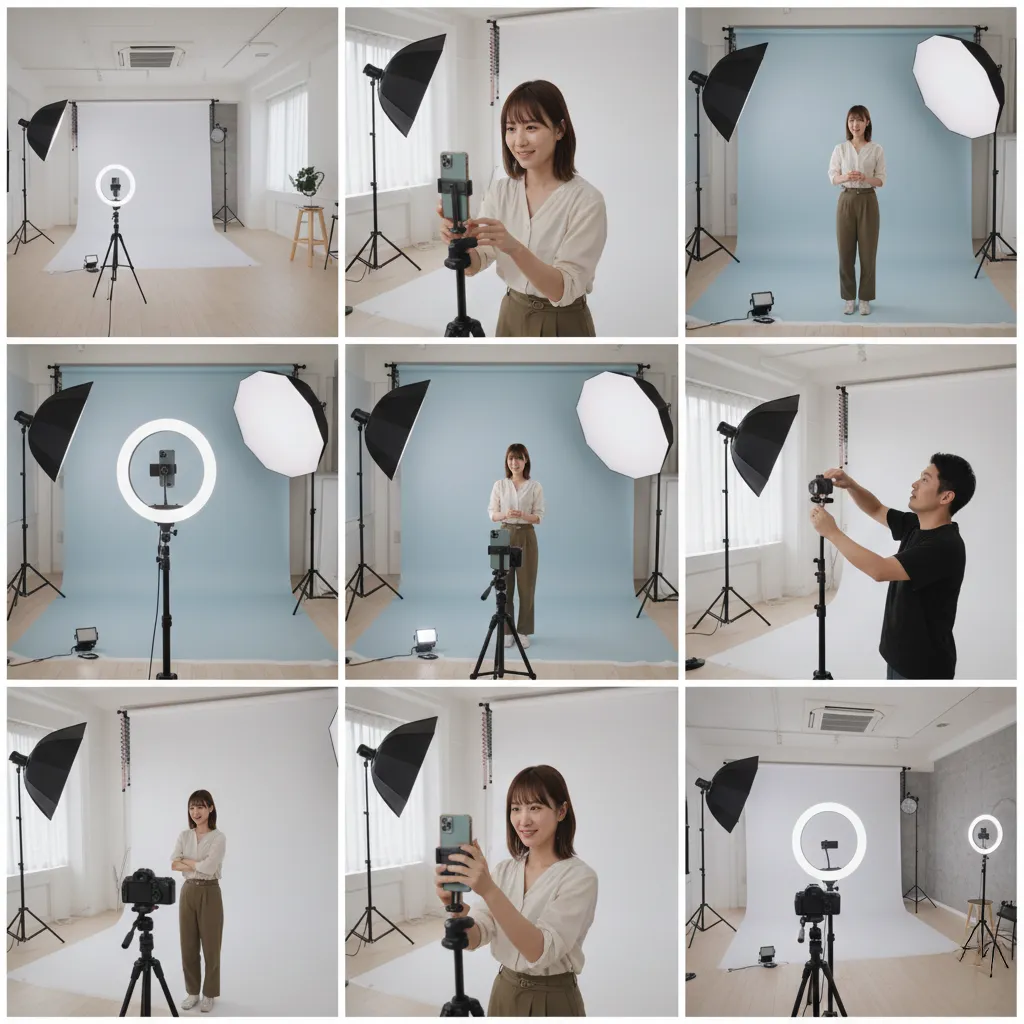
- 🌈 For fashion lookbooks, shoot with a color background paper and wide softboxes
- 🧴 For product photography, place a white acrylic board over a table for a seamless background
- 🪞 Use mirrors or reflectors near the window for soft natural light diffusion
- 📦 For live selling (ライブ販売), position two softboxes at 45° and use a lapel mic
🌇 Example Scenes and Studio Settings
Let’s look at some example studio configurations depending on your content type:
🎙️ Interview Setup
- Two chairs, soft light from both sides
- Background: neutral gray or white paper
- Shot on: 50mm f/1.8, Canon EOS R
🛍️ Product Photography
- Flat lay table + white background
- Top-down lighting with one soft fill light
- Shot on: 24-70mm f/2.8
👩🎤 YouTube Setup
- Natural light from side windows
- Background: bookcase or decor wall
- Shot on: Sony A6400 with 35mm prime
🗣️ Creator Reviews & Testimonials
✨ “I’ve filmed in many places, but this studio near Nishi-Nakajima had the perfect lighting and easy setup. Great for my portrait sessions!” – Kana, Fashion YouTuber
✨ “The space near Shin-Osaka was perfect for our live stream. We had stable internet and great soundproofing.” – Kenji, Tech Reviewer
❓Frequently Asked Questions
Q: Can I film with natural light only?
Yes! Many natural light studios in Osaka offer large windows ideal for soft lighting setups. Check the studio’s time of day recommendations for best results. 🌞
Q: What’s the best lens for shooting in a small space?
A 24mm or 35mm prime lens works great for tight studio spaces. For product close-ups, a macro lens like 60mm is ideal. 📷
Q: Do studios provide equipment?
Most rental photo studios in Osaka provide lighting, backgrounds, and stands. Check in advance if you need cameras or audio gear. 📦
Q: Is it suitable for live streaming?
Yes, especially live streaming studios equipped with high-speed Wi-Fi and sound isolation. 🧑💻
📍 Featured Studio: Access & Info
If you’re looking for a flexible and well-equipped studio in Osaka, check this out:
- 🏠 Address: Osaka-shi, Yodogawa-ku, Nishinakajima 3-16-17, Maruzen Nishinakajima Bldg. 3F, Room 3
- 🚉 Access: 2 mins walk from Nishinakajima-Minamigata Station, 1 min from Minamigata Station
- 🚌 About 5 minutes from Shin-Osaka, 10 minutes from Umeda
- 📡 Studio features: white background, window lighting, backdrop paper, softboxes, high-speed Wi-Fi
- 🎯 Great for: product shots, model shoots, live selling, YouTube content
📌 Whether you’re a beginner or a seasoned pro, this studio provides everything you need to deliver professional content in the heart of Osaka.
📢 Ready to Book Your Next Session?
🎥 Don’t wait to level up your content. Visit our booking page or contact us via LINE to schedule a visit or reserve your next filming day. Our Osaka studio near Nishinakajima is waiting for your creativity to shine!
📩 Contact: critlab2025@gmail.com
crit-Lab
大阪・西中島のレンタル撮影スタジオ Crit Lab。撮影やスタジオ利用に役立つ情報を発信しています。